
Free · Private · No sign-up

Free Online Ukulele Tuner

Tune Standard GCEA, Low-G, Baritone DGBE, or D tuning directly in your browser. This beginner-friendly ukulele tuner listens through your microphone, shows whether each string is sharp or flat, and processes your audio only on your device.

Browser microphone Local audio only Beginner friendly
G · C · E · A

Free Online Ukulele Tuner

Choose your tuning, allow microphone access, and pluck one string at a time. The tuner compares the pitch it hears with the correct note and shows whether the string is flat, sharp, or in tune. No download, account, or recording upload is required.

01

How to Use the Ukulele Tuner

01

Choose the correct tuning

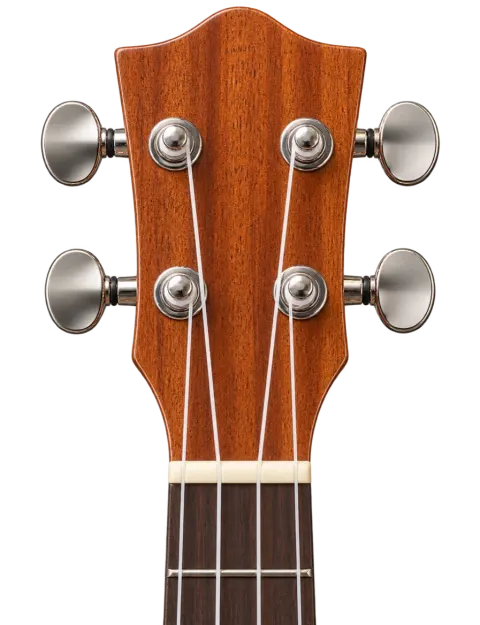
Start with the tuning that matches your instrument and strings. Standard GCEA is correct for most soprano, concert, and tenor ukuleles. Choose Low-G only if your fourth string is made to sound one octave lower, Baritone DGBE for a baritone ukulele, or D tuning for the brighter sound a whole step above standard.
02

Allow microphone access

Press the microphone button and allow access when your browser asks. Play in a reasonably quiet room and keep the ukulele close enough for the microphone to hear it. Audio is analyzed locally in your browser and is never uploaded or saved.

03

Pluck one string at a time

Select a target string, pluck it gently, and let it ring. Tighten a flat string or loosen a sharp string in small movements. Pluck again after every adjustment until the pointer settles in the green center.

02

How to Read the Ukulele Tuner

A tuner measures pitch and compares it with a target note. You do not need to understand the technical numbers to tune accurately: focus on the detected note, the direction indicator, and the center of the meter.

“Flat” means the string is lower than its target pitch and usually needs to be tightened. “Sharp” means it is higher than the target and needs to be loosened. “In tune” means the detected pitch is close enough to the correct note for normal playing. Make small adjustments and pluck the string again after every turn.

If the pointer moves constantly, let the previous note fade before plucking again. Other vibrating strings, conversation, fans, and a very hard attack can make pitch detection less stable. Muting the other three strings with your hand often gives the clearest result.

03

Choose the Right Ukulele Tuning

Standard GCEA

Standard GCEA is the most common tuning for soprano, concert, and tenor ukuleles. From the string nearest your face to the string nearest the floor, the notes are G4, C4, E4, and A4. The high G creates the bright, re-entrant sound associated with a traditional ukulele. If you are a beginner using the strings that came with a typical ukulele, start here.

C♯ tuning G♯C♯FA♯

C♯ tuning raises every Standard GCEA string by one semitone while preserving familiar chord shapes.

B tuning F♯BD♯G♯

B tuning lowers every Standard GCEA string by one semitone while preserving familiar chord shapes.

D Tuning ADF♯B

D tuning raises every string of standard GCEA by a whole step, giving A4, D4, F♯4, and B4. The slightly higher tension produces a brighter, louder sound that suits soprano ukuleles. All familiar chord shapes stay the same; each chord simply sounds a whole step higher.

Low-A tuning ADF♯B

Low-A uses the D-tuning notes with a lower A3 fourth string, creating a wider linear range.

Low-G GCEA

Low-G keeps the note names G, C, E, and A but lowers the G string from G4 to G3. This gives the instrument a wider, more linear range for fingerstyle arrangements and melody playing. Use a string made for Low-G; a normal high-G string will usually become too loose if it is simply tuned down one octave.

Baritone DGBE

A baritone ukulele normally uses D3, G3, B3, and E4. Its tuning resembles the four highest strings of a guitar and sounds lower than Standard GCEA. Do not select this mode for a soprano, concert, or tenor ukulele unless the instrument has been intentionally fitted for DGBE tuning.

04

Tips for Accurate Ukulele Tuning

A stable signal makes any microphone tuner easier to use. These small adjustments help the ukulele tuner identify the fundamental pitch instead of background sound or extra overtones.

New ukulele strings stretch during their first few playing sessions, so they may need frequent retuning. This is normal and does not mean the tuner or instrument is faulty.

  • Tune in a quiet space and move away from fans, televisions, and other instruments.
  • Pluck near the center of the string with a gentle, consistent motion.
  • Mute the three strings you are not tuning so sympathetic vibration does not confuse the microphone.
  • Turn the tuning peg in small increments. Large turns can overshoot the target pitch or place too much tension on the string.
  • When a string is sharp, loosen it slightly below the target and tune upward again so it settles around the tuning post.
  • Check all four strings twice. Changing the tension of one string can slightly affect the others, especially after installing new strings.
05

Ukulele Tuner Troubleshooting

The tuner does not hear the string

Confirm that microphone access is allowed and that the correct input device is selected. Move closer to the microphone and pluck a little more firmly. On a phone, avoid covering the microphone opening with your hand or the body of the ukulele.

The detected note keeps jumping

Reduce background noise, mute the other strings, and wait for each note to fade before playing again. A very loud pluck produces extra overtones, so a softer and more even attack often gives a steadier reading.

The tuner shows the wrong string

Use guided mode and select the string you want to tune. Confirm that Standard GCEA, Low-G, Baritone DGBE, or D tuning is selected correctly. If the pitch is far from its target, adjust slowly until it moves toward the expected note.

Microphone permission was denied

Open the browser’s site settings and allow microphone access, then reload the page. If microphone use is unavailable, play a built-in reference tone and match the string by ear.

The string feels too tight

Stop turning the peg. Check the selected tuning, string name, and octave before continuing. Never force a string toward a note when the tension feels unsafe. A string made for a different tuning may need to be replaced.

Quick answers

Frequently Asked Questions

What is the standard tuning for a ukulele?

Most soprano, concert, and tenor ukuleles use GCEA: G4, C4, E4, and A4. Baritone ukuleles usually use DGBE. A Low-G ukulele still uses GCEA, but the G string is G3 instead of G4.

Can I tune a ukulele with my phone?

Yes. Open this online ukulele tuner in a modern mobile browser, allow microphone access, and pluck one string at a time. No app installation or account is required.

Is this ukulele tuner free?

Yes. The microphone tuner, guided tuning modes, and reference tones are free to use. You do not need to create an account or upload a recording.

Does the tuner record my microphone audio?

No. Pitch detection runs locally in your browser. The raw microphone audio is not uploaded to Uke Tune Along or stored as a recording.

How often should I tune my ukulele?

Tune before each practice or performance and whenever a chord sounds wrong. New strings, temperature changes, humidity, and normal playing can all cause the instrument to drift out of tune.

Should a beginner use High-G or Low-G tuning?

Most beginners should keep the string setup already installed on their ukulele. High-G is the usual starting point and produces the familiar traditional sound. Low-G is useful when you want a deeper fourth string and a wider melodic range.

Why does my ukulele go out of tune so quickly?

New strings need time to stretch, and tuning pegs may shift slightly as you play. Temperature and humidity can also affect string tension. Tune the instrument several times during the first few days after changing strings.

How do I tune a ukulele with a microphone?

Select Standard GCEA tuning, press the microphone button, and allow browser access. Pluck one string at a time in a quiet room. The tuner compares the pitch with the correct note and shows whether the string is flat, sharp, or in tune. Audio is processed locally on your device and is never uploaded.

What is the standard tuning for a beginner ukulele?

Most beginner soprano, concert, and tenor ukuleles use Standard GCEA tuning: G4, C4, E4, and A4. The fourth string (nearest your face) is G4, and the first string (nearest the floor) is A4. This is the tuning that comes with most new ukuleles and the one recommended for beginners.

Can I tune a ukulele without an app?

Yes. This online ukulele tuner works directly in your browser without installing any app or creating an account. Open the page on any device with a microphone, allow access, and start tuning. Reference tones are also available if you prefer to tune by ear without using the microphone.

A learner-built tool

Built alongside a real learning journey

Uke Tune Along was built by a fellow self-learner who wanted a calmer way to tune before practicing. The goal is not to replace a teacher or repair technician, but to make the first few minutes with your instrument easier to understand. The tuner, reference tones, and beginner guides are designed around questions that appear during a real learning journey.

Why this site exists

Your ukulele is ready when you are.

Use the free ukulele tuner whenever a string sounds wrong—no download, sign-up, or audio upload needed.

Tune My Ukulele